See Notifications Triggered in Conversation AI
As a supervisor, you can review when Moments™ notifications were triggered during conversations in Conversation AI. This helps you understand how agents are responding to coaching prompts and identify opportunities for improvement.
Viewing Notification Triggers in Conversation AI
When reviewing conversations in Conversation AI, you can see when Moments™ notifications were triggered during the call. This information appears in the conversation transcript and timeline.
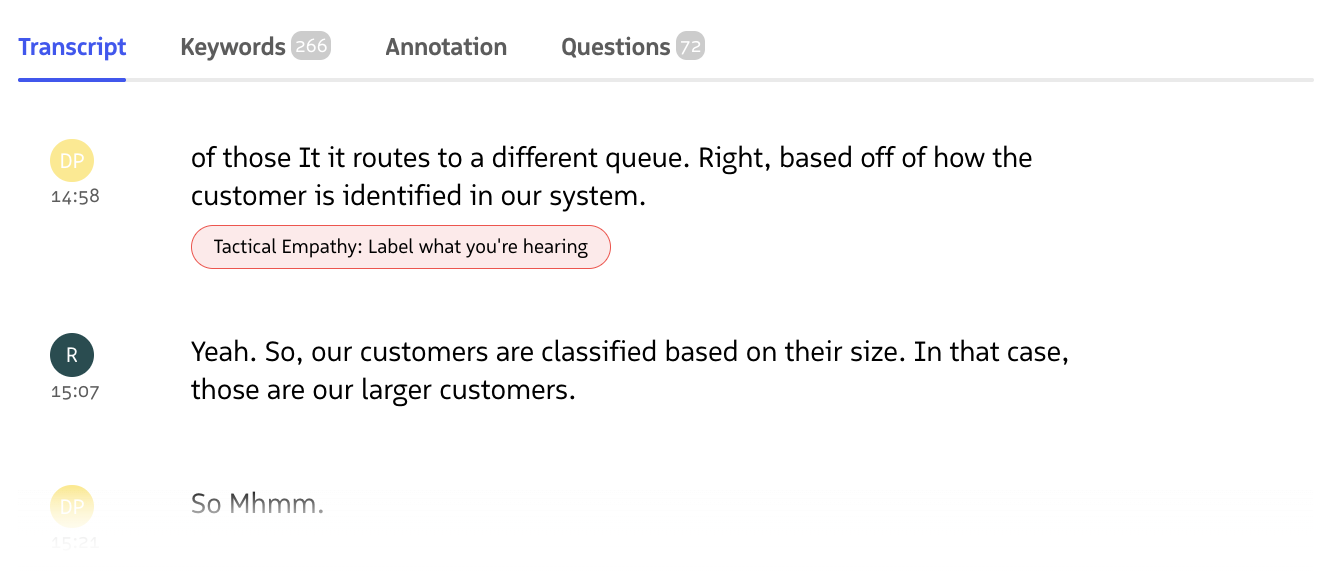
Moments™ Notification displayed as a badge under a spoken phrase in the Call Transcript
Navigate to Conversation AI
- Log into the Revenue App
- Hover over Coaching in the navigation menu
- Click Conversation AI
Open a Conversation
You can open conversations in two ways:
Option 1: Manual Search
- Search for or select a conversation from your team
- Click on the conversation to open it
Option 2: From Reports You can also open recordings directly from Moments™ reports:
- Navigate to the Delivery, Compliance, or Behavioral Insights report
- Click on a specific conversation or recording in the report
- The conversation will open in Conversation AI with notification triggers visible
View Notification Triggers
- In the conversation view, look for notification indicators in the transcript
- Notification triggers appear as markers showing:
- When the notification was triggered (timestamp)
- Which notification was triggered (notification name)
- The context around the trigger (transcript segment)
Understanding Notification Indicators
Notification triggers in Conversation AI are displayed with:
- Timestamp markers showing the exact moment a notification was triggered
- Notification names identifying which Moments™ notification was activated
- Visual indicators that highlight the relevant transcript segment
- Completion status showing whether the agent completed the notification
Using This Information for Coaching
Reviewing when notifications triggered helps you:
- Identify patterns in when agents need coaching during calls
- Evaluate notification effectiveness by seeing if triggers align with coaching goals
- Provide targeted feedback based on specific moments in conversations
- Optimize notification timing and trigger criteria based on real usage data