Migration to Salesforce External Client Apps
New action required — May 11, 2026
Salesforce has issued an additional mandatory security requirement for all External Client App integrations. Administrators must upgrade the Revenue Authentication package to the latest version (0.2.2) to enable two new required settings (PKCE and Refresh Token Rotation) before May 11th, 2026.
Failure to do so will prevent your users from authenticating with Revenue.io. Use the package link below to complete the upgrade.
Revenue.io is updating the Salesforce integration to use a Salesforce External Client App, Salesforce’s current security-focused integration model.
This change is required by Salesforce and is necessary to keep Salesforce data synchronization and user login working. The legacy Salesforce Connected App will be retired and disabled on February 12, 2026.
If you do not finish migration before that date, users cannot access the platform and Salesforce data sync stops until migration is complete.
The migration is straightforward, low risk, and does not change how your teams use Revenue.io or Salesforce.
Why this is happening
Salesforce introduced new, mandatory security requirements for AppExchange integrations to reduce ecosystem risk and strengthen how third-party applications authenticate and access Salesforce data.
As part of this initiative, Salesforce requires partners to move away from legacy Connected Apps and adopt External Client Apps, which provide:
- Stronger authentication boundaries
- Explicit, tightly scoped OAuth authorization
- Improved credential and access management
This change is Salesforce-mandated and required for continued compliance with Salesforce security standards.
| What’s changing | What’s not changing |
|---|---|
| The legacy Salesforce Connected App is replaced by a Salesforce External Client App, as required by Salesforce’s updated security standards | No changes or loss of functionality across our suite of products |
| Authentication and authorization use Salesforce’s current OAuth flows with clearer trust boundaries between Salesforce and external systems | No impact to data, workflows, or automations in your Salesforce organization |
| No change to the permission scope or access level of the integration. The same Salesforce data and objects remain accessible | |
| No changes are required to your Salesforce configuration beyond the migration steps in this article |
Migration steps
Step 1: Install the Revenue Authentication package (0.2.2)
Install the Revenue Authentication package in Salesforce. It contains the new Salesforce External Client App.
Installation links
- Production: Install Revenue Authentication (production)
- Sandbox: Install Revenue Authentication (sandbox)
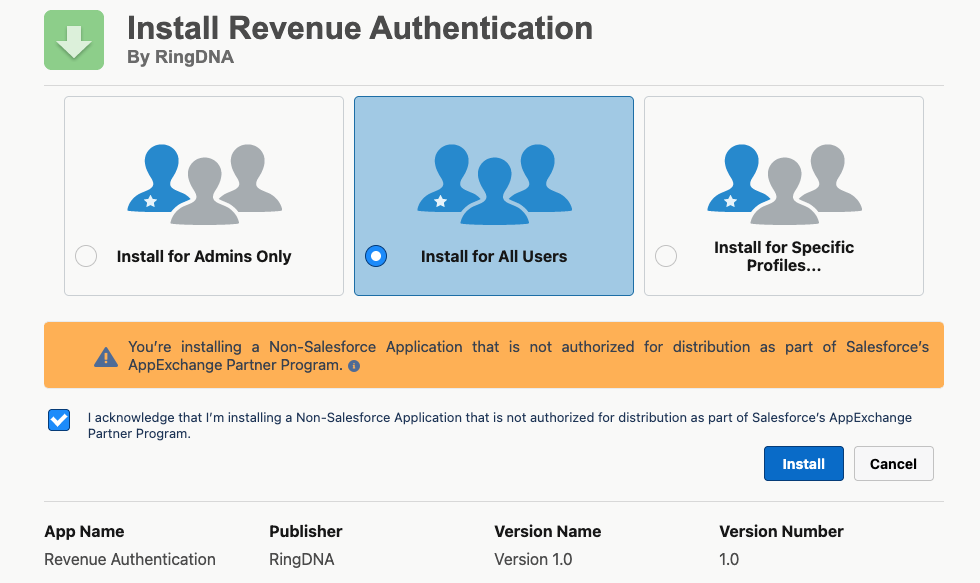
- Open the link for your environment.
- Choose
Install for All Users. - Click Install and wait for installation to finish.
| Component name | Component type |
|---|---|
| Revenue Authentication | External Client App |
| Revenue_Authentication_oauth | External Client Application OAuth Settings |
Step 2: Test the integration
After installation, confirm the integration using the validation tool.
- Open the validation tool.
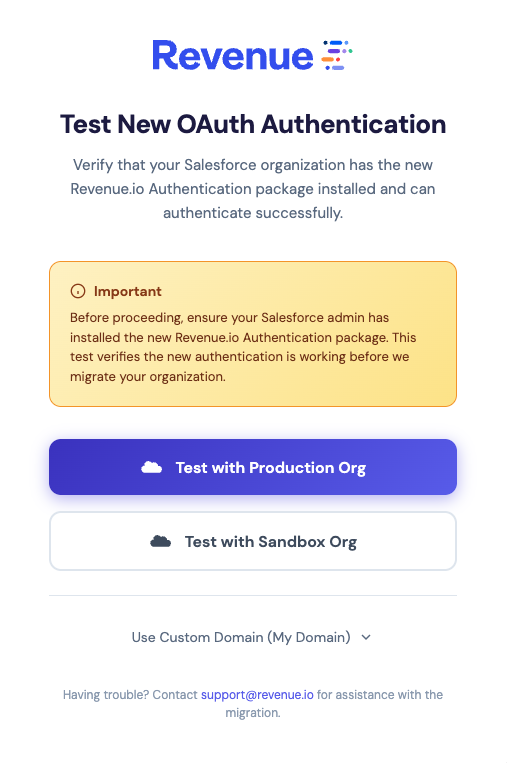
- Click Test with Production or Sandbox Org. If you use a custom Salesforce domain, choose Use Custom Domain.
- Log in to Salesforce if you are not already signed in.
- When you are asked to allow access, click Allow.
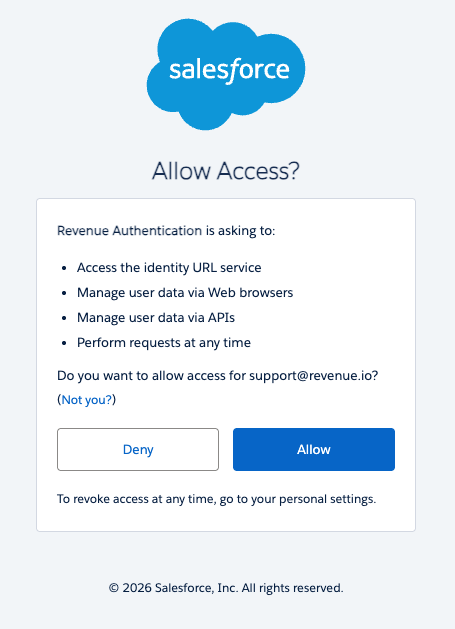
When validation succeeds, you do not need to do anything else. The integration moves to the new External Client App at cutover.
If you run into problems during the test, capture a screenshot or copy the error message and contact Support.
Frequently asked questions
What is an External Client App?
An External Client App is Salesforce’s current integration framework for third-party applications. It sets a clearer trust boundary between Salesforce and external systems by using a dedicated client identity and explicit OAuth authorization flows.
Is any action required from users?
No. A Salesforce admin completes the migration once. Users do not need to take any action. After migration, the integration uses the External Client App at cutover.
Why move away from Connected Apps?
Salesforce mandated new security requirements for Connected Apps and External Client Apps used by AppExchange partners. Salesforce is moving away from legacy integration patterns toward more explicit, tightly scoped authentication models.
External Client Apps are Salesforce’s recommended path for these requirements. This change is required to stay compliant with Salesforce security standards and to keep the integration running.
Is this related to recent Salesforce security incidents or breaches?
Salesforce introduced the updated requirements after recent security events involving other providers in the Salesforce ecosystem. The changes apply broadly to AppExchange partners. This update is not the result of a security incident involving Revenue.io.
Will this affect existing data or automations in Salesforce?
No. Your data, workflows, automations, and user experiences continue to work as they do today. The migration does not change how data is processed or used in Salesforce or in Revenue.io.
Will there be downtime during the migration?
No downtime is expected if you finish the migration steps before the cutover date. We are communicating these changes in advance so you can migrate without service interruption. Orgs that do not finish migration before cutover see a disruption until migration is complete.
Does this impact compliance requirements?
Yes, in a positive way. The updated integration model strengthens access controls and credential management in Salesforce, which supports common compliance frameworks.
Will this require changes in the future?
This change reduces the chance of future disruptive updates. External Client Apps are the integration model Salesforce is investing in long term, which helps keep compatibility as Salesforce security requirements change.
Additional support
Support can provide step-by-step guidance, documentation, and direct assistance during the migration.
Email support@revenue.io.