Sequence Entry & Exit Criteria
Every Sequence includes Entrance and Exit Criteria (when leads or contacts qualify to be added or automatically removed from a Sequence).
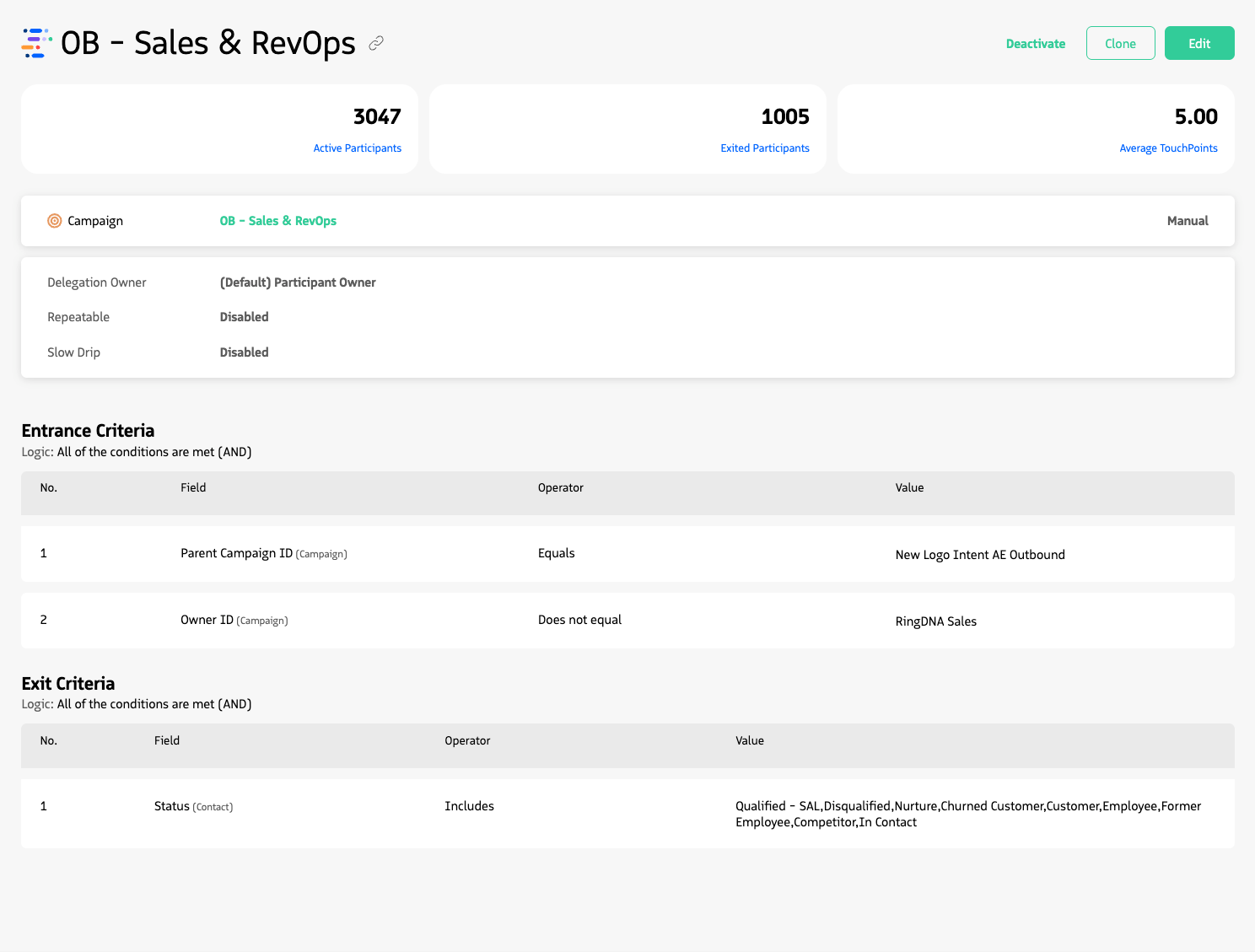
Entry and Exit Criteria.
Sequence criteria
Entrance criteria
For participants to be allowed into a sequence, they need to meet the entrance criteria. These criteria use the participant fields and other associated object fields to evaluate if the participant can be successfully associated to the sequence.
Individual criteria are defined as a combination of a Salesforce field, an operator and a value.
Available fields depend on the record type. A Lead sequence will offer fields from the Lead object. Available operators depend on the type of the chosen field. For example, text fields will offer “Contains”, “Includes”, “Does not equal”, “Equals” and “Starts with” operators.
For example, in a Lead Sequence you might utilize the following criteria: Example entrance criteria for a Lead sequence in Guided Selling.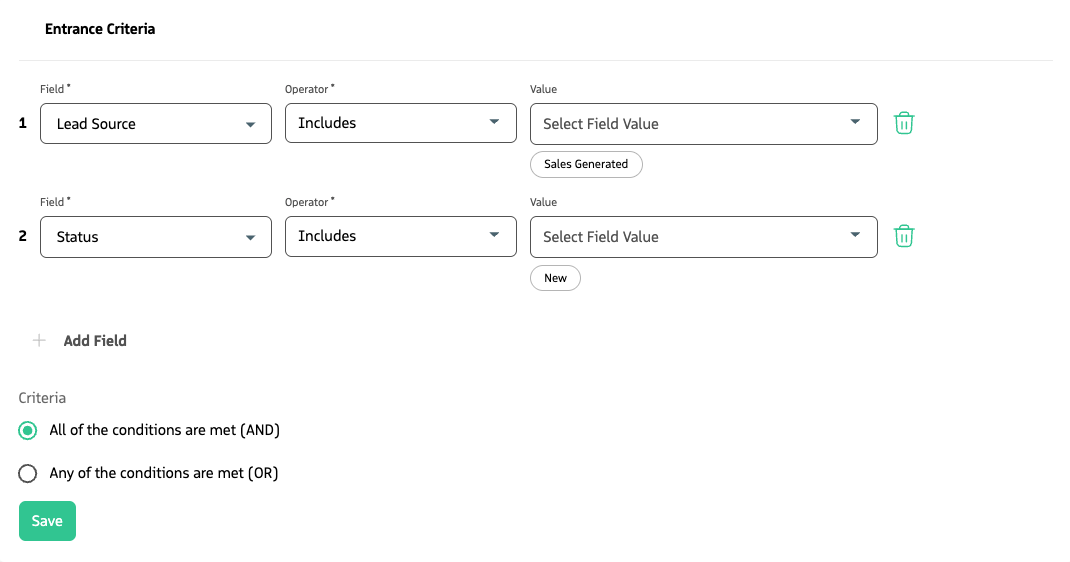
The fields that appear in the criteria dropdown come from the Field Set configured for your sequence record type (e.g., Revenue.io Sequence Leads). To change which fields are available, see Customize Fields in Guided Selling. For supported field types and the operators available for each, see Supported Fields and Operators.
Exit criteria
A participant can leave a sequence when the specified field criteria for exit are met. Exit criteria work much like entrance criteria, but determine when a participant should be automatically removed from a sequence.
For example, taking the previous Lead scenario, you could define exit criteria such that a participant is removed from the sequence when their Status changes to indicate they have engaged or been disqualified. On Engagement, you may want to remove them automatically from the current Sequence and enroll them into a more appropriate Sequence.
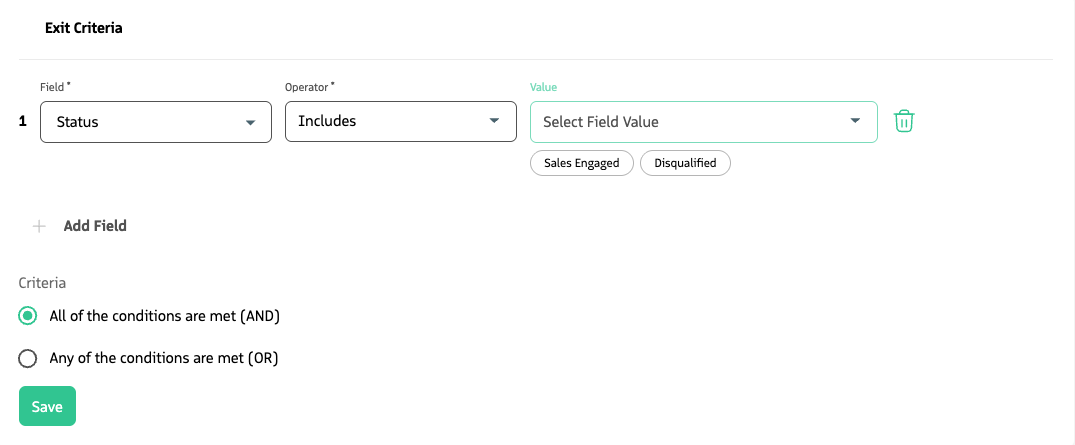
Example exit criteria: remove leads with Rating that includes ‘Warm’.
Completing the exit criteria in the sequence configuration is not the only way for a participant to leave a sequence; there are other ways a participant can be removed, which are covered later in this chapter.
How Participants enter a Sequence
Participants can be added to a sequence through one of the following methods:
- Salesforce Record Update: When a Salesforce record is updated and meets the entrance criteria for an active automatic sequence.
- Activation of an Automatic Sequence: When an automatic sequence is activated and participants meet the entrance criteria but do not meet the exit criteria.
- Manual Addition: When a user manually associates a participant with a sequence.
In addition to meeting entrance criteria, the following must be true for a participant to enter a sequence:
- The participant is not currently associated with any other sequences.
- If the sequence setting “Do you want to control the no. of participants that enter per day?” is enabled, the number of participants who have entered the sequence today is under the specified limit.
- In the case of Campaign sequences, the Campaign is Active.
- If the system setting
Remove duplicate recipientsis enabled, no other participant with the same email is associated with any sequences. - The sequence has less than 20,000 participants, which is the maximum capacity.
Once a participant enters a sequence, they will be assigned a series of actions. If the first action is automatic, such as sending an email, that action will be carried out immediately.
How Participants exit a Sequence
Participants can exit a sequence in several ways. The following table summarizes each exit method.
| Exit method | Description |
|---|---|
| Meeting exit criteria | A participant exits when they meet the defined exit criteria, which are based on field evaluations. |
| Sequence completion | A participant automatically exits once they have completed all assigned actions in the sequence. |
| Lead conversion | For Lead or Campaign-type sequences, when a Lead is converted to a Contact, the participant exits. Completed actions and sequence history are transferred to the new Contact (the Lead is deleted during conversion). |
| Sequence deletion | If the sequence is deleted, all associated participants are removed. |
| Junction deletion | For Opportunity and Campaign sequences, if junction objects such as Opportunity Contact Role or Campaign Member are deleted, the participant is removed from the sequence. |
| Manual removal | A Guided Selling user can remove a participant from a sequence through the user interface. |
| Email replies | Participants can be automatically removed based on email interaction: when they reply to an email action, when their email address sends an automatic response, or when their email address becomes undeliverable. Configure these options under Settings > Email in Guided Selling. |
| Record merges | When Contact or Lead records in a sequence are merged with other records of the same type, a participant exits if their record is merged with another participant who is already associated with a sequence. |
When a participant exits a sequence, the Sequence Association record is updated with two fields that indicate how and why the exit occurred. These fields are useful for reporting, auditing, and troubleshooting.
| Field | Purpose |
|---|---|
Exit Type (RDNACadence__Sequence_Exit_Type__c) | Indicates whether the exit was Manual (a user removed the participant) or Automatic (the system removed the participant due to sequence logic or automation). |
Exit Criterions Met (RDNACadence__Sequence_Exit_Criterions_Met__c) | Records the specific reason for the exit—the exact condition or action that triggered it. For exit criteria–based exits, the field can contain the criteria that were met. |
Update criteria on an existing Sequence
When you update entrance criteria on an existing sequence, new records that meet the revised criteria will be able to enter the sequence.
When you update exit criteria on an existing sequence, participants already in the sequence who meet the new exit criteria will not be removed immediately. Instead, they will be removed during scheduled Batch Jobs that evaluate exit rules and process exits accordingly.