Bulk Update Actions
Role:
Sequence Agent
License:
Guided Selling
Bulk update actions let you apply the same operation to multiple participant actions at once from the Engage view. This helps you manage high action volume faster and with fewer clicks.
Bulk Operations Available
From the Engage view, you can run these bulk operations on selected actions:
| Operation | Description |
|---|---|
Complete | Mark multiple task actions as completed. |
Send | Send multiple manual email actions. |
Skip | Skip multiple actions and advance participants of a specific action type. |
Reschedule | Set a new due date and time for multiple actions of a specific action type. |
Skip all | Skip all selected actions. |
Reschedule all | Reschedule all selected actions. |
Performing Bulk Updates
Select Actions
- Open the
Engageview. - Use the checkboxes to select multiple actions.
- You can select actions across different participants and sequences.
Choose a Bulk Operation
- After selecting actions, the bulk action menu opens automatically.
- Choose an operation: reschedule, skip, or send/complete by action type, or select:
Reschedule allSkip allUnselect all
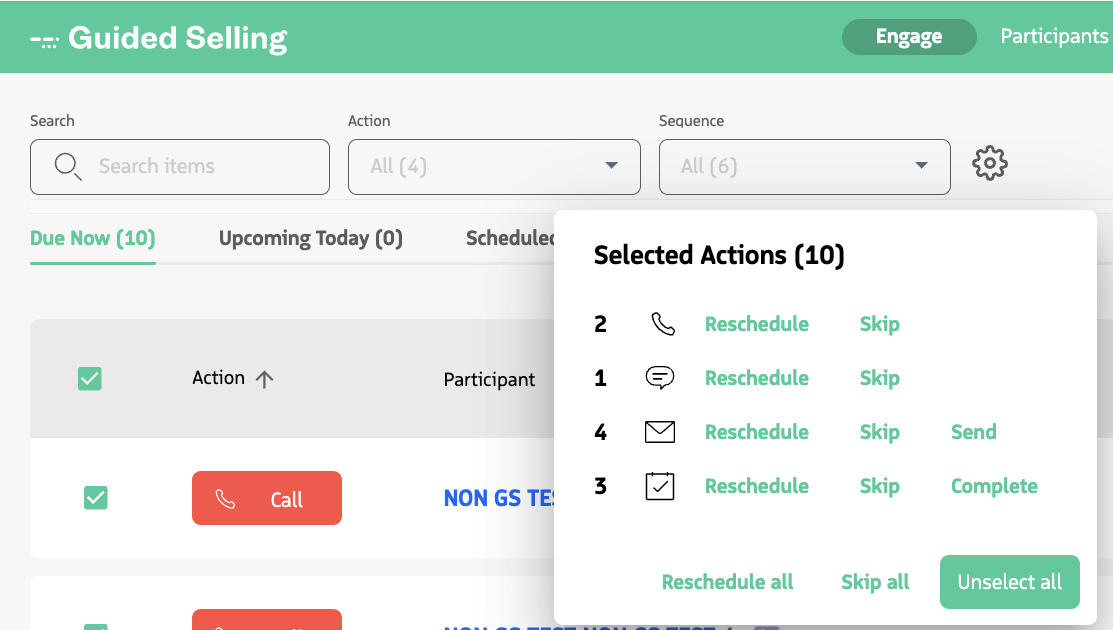
Bulk Rescheduling Details
When you reschedule multiple actions:
- Every selected action is updated to the same new date and time.
- Subsequent actions for affected participants are automatically recalculated.
Original Due Datestores the system-calculated due date from before the reschedule.
Best Practices
- Use filters first to narrow results before selecting actions in bulk.
- Double-check your selection before confirming.
- Use bulk updates for routine queue cleanup and maintenance.
- Be careful with
Remove Selected, since it affects participant sequence progress. - Verify results after processing, especially for large selections.
Limitations
- Large bulk operations can take longer to finish.
- Some actions may be ineligible for certain operations depending on their current state.
- Partial completion can occur; always review the results after the operation finishes.
Last updated on